
Dony Novaliendry* | Wahyu Zulya Syaputra | Agariadne Dwinggo Samala | Rizkayeni Marta
© 2025 The authors. This article is published by IIETA and is licensed under the CC BY 4.0 license (http://creativecommons.org/licenses/by/4.0/).
OPEN ACCESS
Tsunami disaster mitigation plays a crucial role in minimizing casualties and infrastructure damage, especially in high-risk coastal areas like Cilacap Regency, Indonesia. Current disaster mitigation methods primarily rely on conventional training, which lacks interactivity and fails to accurately simulate real disaster conditions. To address this limitation, this study designs a Virtual Reality (VR)-based disaster mitigation simulation that provides an immersive and interactive experience for users in responding to tsunami threats. The application is developed using the Multimedia Development Life Cycle (MDLC) method and built with Unity3D, utilizing the Oculus Quest 2 as the VR platform. The simulation covers key disaster scenarios, including earthquake tremors, seawater recession, tsunami wave impact, and guided evacuation routes through visual and auditory cues. Unlike traditional drills, the VR system provides an interactive, immersive, and repeatable training environment, enhancing user engagement and preparedness without physical risks. Black-box testing validated system functionality, ensuring reliable performance. By integrating 3D environmental data from prior studies, this cost-effective and scalable solution offers a transformative approach to tsunami preparedness education, significantly improving community awareness and response capabilities in tsunami-prone regions.
disaster mitigation, tsunami, Virtual Reality, disaster simulation, disaster education
Tsunamis are destructive natural disasters capable of devastating infrastructure and causing significant loss of life. Cilacap, located on the southern coast of Java, faces a high tsunami risk due to subduction activity. A notable example is the 2006 earthquake, which had a magnitude of 7.8 Mw and resulted in 124 deaths and 33 missing persons [1]. Moreover, Indonesia's Meteorology, Climatology, and Geophysics Agency (Badan Meteorologi, Klimatologi dan Geofisika/BMKG) has predicted potential tsunami waves reaching up to 28 meters along Java’s southern coast, highlighting the urgency of disaster mitigation efforts in Cilacap [2].
Non-structural mitigation efforts, particularly those focused on educating the public about tsunami preparedness in Cilacap, require further enhancement. A survey conducted by Indonesia’s National Disaster Management Agency (BNPB) in 2023 revealed that, although coastal communities are aware of disaster preparedness, the majority have never participated in evacuation training or simulations, with 69% of Cilacap’s coastal residents never participating in evacuation drills [2, 3]. This underscores the need for more innovative, interactive, and immersive approaches to improving community preparedness.
Conventional training methods, such as physical drills and text-based education, suffer from several limitations:
•Limited engagement and realism, physical drills and text-based materials often fail to convey the emotional urgency of real disaster scenarios. Field simulations lack sensory immersion, such as the sounds, ground shaking, or environmental destruction associated with actual disasters, causing some participants to lack seriousness and potentially disrupt others who are more engaged [4].
•High costs and logistical complexity, physical drills require substantial resources, including equipment, venues, and coordination, which limit their frequency and accessibility.
Virtual Reality (VR) technology offers an effective solution for disaster simulations by providing realistic experiences without physical risks [5]. VR enables users to recognize early tsunami warning signs, follow evacuation routes, and experience the disaster's impact in a more profound manner compared to traditional methods [5]. Compared to Augmented Reality (AR), VR technology offers superior immersion in virtual disaster simulations by providing a first-person point of view (POV) that places users directly within the disaster scenario. While AR overlays digital elements onto real-world environments, delivering a third-person POV that feels detached [6], VR fully immerses users in a controlled, computer-generated environment, enabling them to experience events like earthquakes or tsunami waves as active participants, enhancing sensory realism and emotional impact.
Previous studies have demonstrated that VR enhances memory retention, comprehension, and disaster preparedness. Research on flood disaster preparedness [7] and volcanic eruption preparedness [8] supports this claim. Additionally, VR is more cost-effective than physical simulations, as it does not require specialized equipment or additional infrastructure and can be used repeatedly without logistical constraints [5]. Furthermore, as an educational medium, VR supports learning styles that involve physical movement (kinesthetic) [9], and provides an immersive and interactive learning experience proven to enhance understanding, such as in sign language education [10]. This highlights VR's broader potential as a powerful educational tool across various disaster contexts.
It was also concluded that virtual lab applications can help overcome the lack of funding for procuring physical equipment and materials [11]. This finding reinforces the value of VR as a cost-effective educational tool. In the context of tsunami disaster preparedness, VR can similarly reduce the need for expensive physical simulation tools while still offering an immersive and interactive learning experience. By leveraging VR’s immersive qualities, the simulation not only delivers practical training but also deepens users' understanding of disaster mitigation strategies.
Given this urgency, this study proposes the development of a VR simulation for tsunami disaster education and mitigation in Cilacap. The simulation will present interactive scenarios, including earthquake tremors, seawater recession, tsunami waves, and evacuation routes that users can follow. Through this approach, it is expected that public understanding and preparedness for tsunami disasters will be significantly improved.
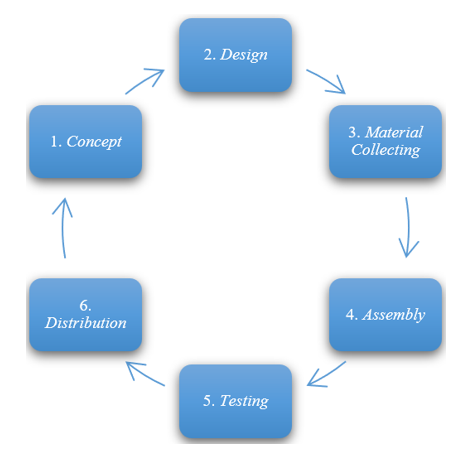
A virtual simulation for tsunami disaster mitigation is designed using the Luther-Sutopo version of the MDLC method, developed in six stages: concept, design, material collecting, assembly, testing, and distribution [12], as illustrated in Figure 1.
Figure 1. MDLC stages
2.1 Concept
The conceptual stage aims to define the objectives and intended users of the program (audience identification). This study involves designing a virtual simulation for tsunami disaster mitigation in Cilacap, with the goal of developing a VR-based mitigation framework. At this stage, an analysis of the current system is conducted to understand how local institutions manage tsunami disaster mitigation and to identify existing problems that can serve as a foundation for the proposed system design.
Based on reports released by the Cilacap Regional Disaster Management Agency (Badan Penaggulangan Bencana Daerah/BPBD) and the Cilacap Regency Government, BPBD Cilacap has implemented disaster mitigation programs. Two main approaches have been employed: (1) conventional disaster mitigation simulations, where communities are trained in self-evacuation procedures such as taking cover under tables during earthquakes and running toward designated evacuation locations along marked routes, and (2) mitigation education and outreach, which involves the dissemination of disaster risk information and preparedness materials.
However, based on current practices, no interactive and virtual tsunami disaster mitigation system has been identified that aligns with the approach proposed in this study, as highlighted in the research conducted by Anggraheni et al. [13].
Several limitations are associated with the conventional disaster mitigation approach. These include difficulty for the public in understanding real disaster scenarios, lack of mental and emotional adaptation to the stress that may occur during actual events, and limited simulation frequency, which is generally scheduled and not accessible at any time.
One potential solution to mitigate the limitations of conventional methods is the integration of disaster mitigation with Virtual Reality (VR) technology. Through VR, which can replicate realistic conditions such as earthquake visualizations and tsunami effects, communities can gain immersive experiences that help train both mental and emotional preparedness. Additionally, VR simulations can be accessed at any time, offering more flexible and scalable training opportunities.
Based on the analysis of the current system, a proposed system is developed that integrates conventional mitigation methods with VR technology to improve the quality of disaster preparedness training. The proposed system is structured into several menus and features within the VR application. These include a main menu as the access point to other parts of the application, an instruction menu to train users in operating the VR simulation, a settings menu, a developer information menu, and a simulation menu designed to visualize the three main disaster events—earthquake, receding seawater, and tsunami—as shown in Figure 2.
Figure 2. Tsunami disaster scenario
The designed features include an initial VR guide, directional arrows to indicate evacuation routes, tsunami impact visualizations, and environmental monitoring panels to observe conditions at evacuation points.
2.2 Design
The design stage involves creating specifications for program architecture, style, appearance, and material requirements. The VR application will be developed using Unity software, which is primarily object-oriented, making Unified Modeling Language (UML) an essential tool for structuring the VR-based tsunami disaster mitigation simulation.
This study’s design incorporates multiple media, including text, audio, animations, images, and 3D objects, which will be placed across various menus, including the main menu and other interactive menus.
2.2.1 Flowchart
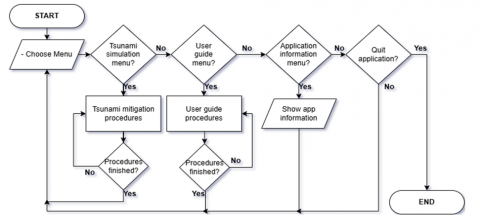
Figure 3 illustrates the general application design flowchart for the virtual tsunami disaster mitigation simulation in Cilacap:
2.2.2 Use case diagram
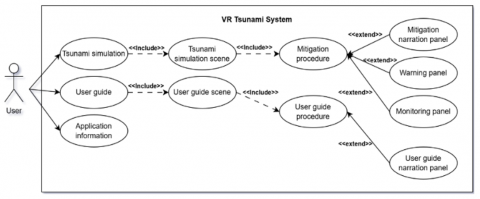
A use case diagram describes the interaction between one or more actors and the system. It outlines system functions and the actors authorized to access them [14]. In the VR tsunami simulation for Cilacap, the use case diagram in Figure 4 illustrates three primary functions accessible to users:
2.2.3 3D modeling
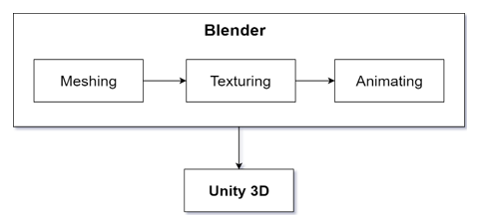
The 3D modeling stage involves designing object models to be used in the Virtual Reality tsunami disaster mitigation simulation. This stage not only includes independently creating objects but also utilizes 3D environmental data of Teluk Penyu Beach obtained from Muhammad Yudhi Rezaldi's research on Unmanned Aerial Vehicle (UAV) and Photogrammetric Technique for 3D Tsunami Safety Modeling in Cilacap, Indonesia [15]. Additional independently modeled objects include oceanic conditions before a tsunami, tsunami waves, and post-tsunami flooding. Other disaster indicators such as flocks of birds and stranded fish during tidal shifts are also incorporated. The objects will be modeled using Blender 4.2, which enables a wide range of functionalities, including modeling, animating, rendering, texturing, skinning, rigging, weighting, non-linear editing, scripting, post-production compositing, and much more [16]. Unity3D will be used for compiling and refining all 3D assets. The 3D modeling system follows these phases:
Figure 5. 3D modeling process
2.2.4 UI/UX Design
The application design adopts a flat design concept that is simple and minimalistic, incorporating Human-Computer Interaction (HCI) principles to ensure the application can be operated comfortably while emphasizing readability, consistency, and ease of interaction, such as high-contrast colors, consistent panel layouts, and visual-audio cues to confirm user actions [17]. This approach ensures accessibility for users across different age groups, particularly adults and older users. Readable typography, clear feedback, and a minimalist layout contribute to an intuitive and comfortable user experience [18, 19]. Flat design features include minimal textures and 3D effects, clear icons and graphical elements, symmetric layout, and intuitive navigation.
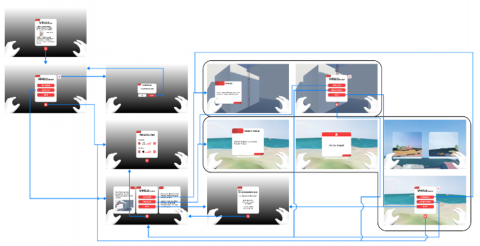
The UX design principles applied to VR include User-centered design, Consistency, Hierarchy, Comfort of the users, and Empathy [15]. The UI/UX development stage is based on Applebee’s theory [20, 21], which involves several phases: beginning with the wireframe, serving as the foundational layout for the interface design; followed by the visual design, which provides a realistic visual representation based on the wireframe; and concluding with the blueprint, which outlines the flow of user interaction for each UI element, as illustrated in Figure 6.
Figure 6. UI blueprint
2.3 Material collecting
At this stage, relevant data and materials are collected, including academic literature and input from BRIN researchers. Visual assets such as 3D models, visual effects, and 2D images, along with audio materials like sound effects and instructional voice-overs, are compiled within the Unity application's Assets window.
2.4 Assembly
All collected assets are integrated and developed in Unity. A virtual environment is built using OpenXR to support interaction with the Oculus Quest 2. Interactive elements such as navigation and object collision responses are implemented. Audio effects are synchronized with user interactions, and visual enhancements are applied using the Universal Render Pipeline (URP), visual effects (VFX), and post-processing.
2.5 Testing
This stage ensures the application functions as designed. Testing is conducted on the Oculus Quest 2, using black-box testing to verify that each feature performs according to its specifications [22].
2.6 Distribution
The final application is exported as an APK file for Android and initially distributed via cloud storage (e.g., Google Drive) along with an installation manual for Oculus. For the long term, submission to the Oculus App Store is planned, requiring compliance with Oculus guidelines, including performance optimization and content review. Target users include coastal residents, schools, and BPBD Cilacap staff. Potential collaborators, such as BPBD and local non govermental organizations (NGOs), will facilitate workshops to promote adoption.
3.1 Development result
This In the design of this final project, several stages were carried out in accordance with the MDLC method. During the concept stage, an analysis was conducted on the existing system related to tsunami disaster mitigation in Cilacap. The results of the analysis were developed into several menus or features within the proposed VR system. At this stage, a needs analysis for application development was also performed. Once the analysis stage was completed, the process proceeded to the design stage.
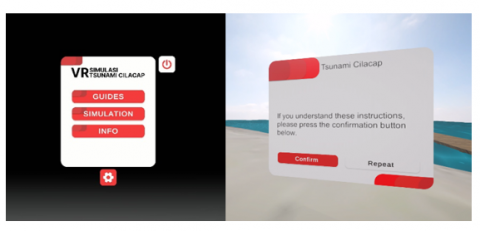
The design stage began with the creation of an overall application flowchart, followed by the development of several UML models, including use-case diagrams, activity diagrams, class diagrams, and object diagrams. Subsequently, the design of 3D models and the required UI/UX was carried out. The 3D models were categorized into several types, including environmental models, organic models supporting simulation, non-organic models supporting simulation, and evacuation support models. The UI/UX design adopted a simple and minimalist flat design concept, incorporating HCI principles such as high-contrast colors (e.g., black text on white backgrounds), consistent panel layouts, and visual-audio cues.
to confirm user actions. These elements enhance readability, consistency, and ease of interaction, ensuring the application is user-friendly for all users as shown in Figure 7. The UI/UX design process started with wireframe creation, followed by visual design, and concluded with the development of a blueprint.
Figure 7. UI/UX design
In the material collection stage, the necessary assets were gathered and created based on the design. The collected or created assets included visual assets, such as 3D models, images, and visual effects, as well as audio assets, comprising sound effects and audio instructions.
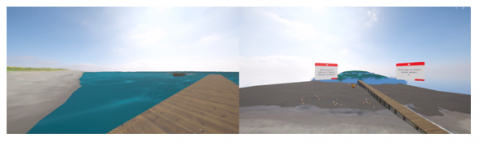
All collected and created assets were then integrated during the implementation stage, which utilized Unity3D comprehensively. In this stage, the virtual environment was developed using the OpenXR API. This was followed by the development of interactions, including UI interactions and interactions with triggers on colliders. To achieve more realistic sea waves and tsunami effects, experiments were conducted using water physics simulation programs in Unity. However, these caused lag and performance issues. As an alternative, 3D mesh animations and shader graphs were employed, resulting in visuals closely resembling actual tsunami waves, as shown in Figure 8, while maintaining lightweight program performance.
Figure 8. 3D tsunami mesh animation
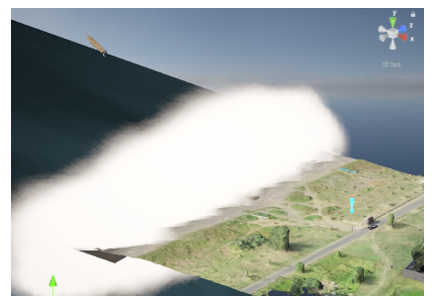
To create the foam effect of tsunami waves, VFX particles were used, as depicted in Figure 9.
Figure 9. Foam effect
Additionally, post-processing was applied to produce darker and blurrier visuals for users’ eyes when struck by the tsunami.
The testing stage was conducted after the implementation stage was completed. The purpose of this stage was to ensure the system functioned as intended according to the design. Testing was performed using an Oculus device directly connected to the project. If errors in the program or system were identified during testing, revisions were made until the system aligned with the design.
Once the project outcomes met the design requirements during the testing stage, the next stage was distribution. To make the application accessible to users, the VR project was built for the Android platform, generating an APK file that could be installed on Oculus devices. The distribution stage was divided into two schemes: a short-term scheme involving the distribution of the APK and a manual book via Google Drive, and a long-term scheme involving the distribution of the application through the official Oculus App Store.
3.2 Test result
The application testing was conducted using the black box method, with the primary focus on ensuring that each feature and function of the application works according to specifications without examining the internal code. Table 1 contains the list of black box testing features.
Table 1. The list of black box testing features
|
No. |
Feature Tested |
Expected Output |
Test Result |
|
1. |
VR Navigation |
The user moves in the virtual space according to the direction provided by the thumbstick. |
Success |
|
2. |
Switch to User Guide Virtual Room |
The user switches from the main menu room to the user guide room. |
Success |
|
3. |
Switch to Tsunami Simulation Virtual Room |
The user switches from the main menu room to the tsunami simulation room. |
Success |
|
4. |
Display Info Panel |
The Developer Information Panel appears. |
Success |
|
5. |
Exit Application |
The Tsunami Simulation VR application is terminated. |
Success |
|
6. |
Display Settings Panel |
The Settings Panel appears. |
Success |
|
7. |
Increase and Decrease Sound Effect Volume |
The sound effect volume decreases or increases according to the selected button. |
Success |
|
8. |
Mitigation Procedure Program |
The procedure program aligns with the flow of the tsunami disaster mitigation simulation. |
Success |
|
9. |
Sound on Simulation Narration Panel |
Voice-over narration sound is heard when the narration panel appears. |
Success |
|
10. |
Walking Sound Effect |
Sound effect is heard according to the type of surface the user’s character steps on. |
Success |
|
11. |
Wave Crash Foam Effect |
Visual wave crash foam appears accompanied by crash sound. |
Success |
Based on the design outcomes of the VR application for tsunami disaster education and mitigation at Teluk Penyu Beach, Cilacap, it can be concluded that a VR-based application has been successfully developed for tsunami disaster mitigation at Teluk Penyu Beach, Cilacap. This application serves as an educational medium for learning about tsunamis and their mitigation measures. With a simple UI/UX design, the application is crafted to enhance readability, consistency, and ease of interaction, making it accessible and user-friendly for diverse community groups.
[1] Rezaldi, M.Y., Yoganingrum, A., Hanifa, N.R., Prasetyadi, A., Kongko, W., Kaneda, Y. (2023). The natural warning signs of tsunami earthquake in Indonesia: Case of the 2006 Cilacap event. Environmental Hazards, 22(5): 456-474. https://doi.org/10.1080/17477891.2023.2190871
[2] Jadwal Rencana Terbit Publikasi BNPB Tahun 2023. https://bnpb.go.id/en/jadwal-rilis-2023.
[3] Hendra, J. (2022) Konsep Dan Desain Virtual Reality: Untuk Program Pelatihan Di Sekolah Menengah Kejuruan. Badan Penerbit UNM, Badan Penerbit UNM.
[4] Maliki, R.Z., Listiqowati, I., Novarita, A., Hermawan, I.M., Abram, A. (2024). Implementasi media pembelajaran virtual reality (VR) dalam membangun kesiapsiagaan bencana banjir di sma negeri 1 torue. Jurnal Pendidikan Geosfer, 9(2): 206-217. https://doi.org/10.24815/jpg.v9i2.12345
[5] Benardi, A.I., Sumarmi, S., Bachri, S., Suharini, E., et al. (2025). Student’s disaster preparedness of Merapi Volcano, Indonesia using Learning Simulation Virtual Reality (LSVR) Model.Jurnal Pendidikan Geografi: Kajian, Teori, dan Praktek dalam Bidang Pendidikan dan Ilmu Geografi, 30(1): 3. https://doi.org/10.17977/2527-628X.1181
[6] Samala, A.D., Rawas, S., Rahmadika, S., Criollo-C, S., Fikri, R., Sandra, R.P. (2024). A bibliometric taxonomy of virtual reality in education: Global trends and key challenges across multiple indices and leading publishers. Research Square. https://doi.org/10.21203/rs.3.rs-5051188/v2
[7] Novaliendry, D., Rahmani, A., SriWahyuni, T., Fajri, B.R. (2023). Web-based virtual laboratory design in class XI chemistry subject. International Journal of Online & Biomedical Engineering, 19(17): 4-18. https://doi.org/10.3991/ijoe.v19i17.45491
[8] Mustika, M. (2018). Rancang bangun aplikasi sumsel museum berbasis mobile menggunakan metode pengembangan multimedia development life cycle (MDLC). MIKROTIK: Jurnal Manajemen Informatika, 8(1): 1-14.
[9] Santoso, J.T. (2021). Desain & Analisis Sistem Berorientasi Obyek dengan UML. Penerbit Yayasan Prima Agus Teknik.
[10] Rezaldi, M.Y., Yoganingrum, A., Hanifa, N.R., Kaneda, Y., Kushadiani, S.K., Prasetyadi, A., Nugroho, B., Riyanto, A.M. (2021). Unmanned aerial vehicle (UAV) and photogrammetric technic for 3D tsunamis safety modeling in Cilacap, Indonesia. Applied Sciences, 11(23): 11310. https://doi.org/10.3390/app112311310
[11] Zebua, T., Nadeak, B., Sinaga, S.B. (2020). Pengenalan dasar aplikasi blender 3D dalam pembuatan animasi 3D. Jurnal ABDIMAS Budi Darma, 1(1): 18-21.
[12] Yudhanto, Y., Susilo, S.A. (2024). Panduan UI/UX Aplikasi Digital.Elex Media Komputindo.
[13] Anggraheni, H.S., Kharisma, A.P., Adikara, P.P. (2025). Eksperimen penerapan framework desain user interface untuk lanjut usia pada PLN mobile untuk meningkatkan usability kepada pengguna pra-lanjut usia. Jurnal Pengembangan Teknologi Informasi dan Ilmu Komputer, 9(1): 1-10.
[14] Mika, A. (2025). VR in UX design: Basic guidelines for a better experience. Ramotion Blog. https://www.ramotion.com/blog/vr-in-ux-design/.
[15] Applebee, S., Deruette, A. (2017). Getting started with VR interface design. https://www.smashingmagazine.com/2017/02/getting-started-with-vr-interface-design/.
[16] Novaliendry, D., Permana, A., Dwiyani, N., Ardi, N., Cheng-Hong, Y., Saragih, F.M. (2024). Development of a semantic text classification mobile application using tensorflow lite and firebase ML Kit. Journal Européen des Systèmes Automatisés, 57(6): 1603-1611. https://doi.org/10.18280/jesa.570607
[17] Novaliendry, D., Saltriadi, K.S., Mahyuddin, N., Sriwahyuni, T., Ardi, N. (2022). Development of interactive media based on augmented reality for early childhood learning around the home. International Journal of Interactive Mobile Technologies, 16(24): 4-20. https://doi.org/10.3991/ijim.v16i24.34501
[18] Novaliendry, D., Yoga Saputra, R.F., Febrianti, N., Putra Yanto, D.T., Saragih, F.M., Yusof Rahiman, W.M. (2024). Development of a digital twin prototype for industrial manufacturing monitoring system using IoT and augmented reality. International Journal of Online & Biomedical Engineering, 20(3): 4-23. https://doi.org/10.3991/ijoe.v20i03.47101
[19] Alsalameen, R., Almazaydeh, L., Alqudah, B., Elleithy, K. (2023). Information technology students' perceptions toward using virtual reality technology for educational purposes. International Journal of Interactive Mobile Technologies, 17(7): 148-166. https://doi.org/10.3991/ijim.v17i07.37211
[20] Abdullah, R., Mohd Nawi, M.N., Salameh, A.A., Deraman, R., Harun, A.N. (2024). Enhancing collaborative learning in mobile environments through interactive virtual reality simulations. International Journal of Interactive Mobile Technologies, 18(11): 15-26. https://doi.org/10.3991/ijim.v18i11.49049
[21] Fajri, B.R., Fitri, A.D.L., Huda, Y., Huda, A., Christy, J. (2023). Virtual reality simulation design for the use of personal protection equipment for the pertamina refinery area. Jurnal Teknologi Informasi dan Pendidikan, 16(1): 97-108.
[22] Hadi, A., Ghaffara, M.Z., Yandi, N.Y., Budayawan, K., Fajri, B.R. (2021). Virtual build design of simulator soldering. Journal Technology Informasi dan Pendidikan, 14(3): 208-216. https://doi.org/10.24036/jtip.v14i3.496